

Lookup a Tesla Build Sheet
See original factory specs, options, and features for Tesla vehicles
* Build sheets are $9.95. If a Tesla build sheet isn't available, see if there is a window sticker.







Tesla Build Sheet
Looking for original factory specifications for your Tesla? A Tesla build sheet can help identify factory configuration details such as options, packages, paint, drivetrain, and equipment. iSeeCars created a Tesla Build Sheet tool: enter any Tesla VIN and the tool checks whether build sheet data is available. If a build sheet isn't available, the tool searches for the availability of a window sticker or similar vehicle document details.
How Do I Get a Tesla Build Sheet?
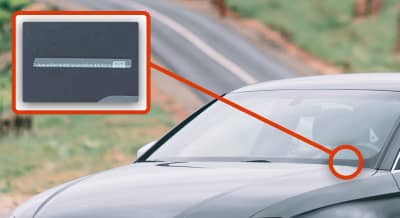
Find the Tesla vehicle's VIN number
You can typically find the VIN on the driver's side dashboard near the windshield or on the label inside the driver's door frame.

Enter the Tesla VIN
Enter the 17 alphanumeric VIN in the VIN box and click the "Look Up Build Sheet" button.
Get the Tesla build sheet
You will see a build sheet if there is one available. Download, save or print it.
Frequently Asked Questions
What is a Tesla build sheet, and is it called something else at Tesla?
“Build sheet” is industry shorthand for the document that lists a specific vehicle’s VIN (Vehicle Identification Number) along with factory-installed equipment, options, drivetrain, paint, interior, and production data. Tesla does not use the phrase “build sheet” internally or in customer-facing documents. The closest Tesla-native equivalents are: the Order Agreement (signed at purchase), the Vehicle Configuration screen inside a Tesla account at tesla.com and within the Tesla mobile app, the federally required Monroney label (window sticker) issued for new vehicles, a VIN decode that reflects factory attributes in that 17-character identifier, and the internal Toolbox/service build data that Tesla service technicians can access. Collectively, these stand in for the legacy “build sheet” utilized by other brands.
Does Tesla print a traditional paper build sheet for each vehicle?
No. Tesla has never produced a customer-facing paper build sheet of the kind found taped under a classic Mustang's rear seat or stuffed into a Camry's spare-tire well. Production data lives in Tesla's manufacturing systems and is exposed to owners primarily through digital interfaces — the Tesla account portal, the app, and the Monroney. The original Roadster era (2008–2012) is the partial exception: those cars were hand-assembled in low volume at the Lotus facility in Hethel and finished in Menlo Park, California, and individual production records were maintained as engineering documents rather than as standardized customer-facing sheets.
What information does a Tesla build sheet typically contain?
Collected across the Order Agreement, account configuration screen, and Monroney label, a Tesla build record will generally show: VIN, model and trim (e.g., Model S Plaid, Model 3 Long Range AWD, Model Y Performance, Cybertruck All-Wheel Drive, Cybertruck Cyberbeast), exterior paint, wheel selection, interior color and material, glass roof type, tow package presence, Autopilot/Enhanced Autopilot/Full Self-Driving Capability status at delivery, Supercharging entitlement notes, model year, country of assembly, and assembly plant. Battery chemistry and battery pack capacity are sometimes implicit (tied to trim and build window) rather than explicitly stated. Autopilot hardware revision (HW2.0, HW2.5, HW3, HW4/AI4) is generally not printed on the Monroney but is recoverable from service records.
How do I obtain a build sheet for my Tesla?
For a vehicle you own, work through the available channels in this order:
- Tesla account at tesla.com — sign in, go to the vehicle-specific interface, and review the Manage and Specs sections, which list trim, options, paint, interior, and Autopilot package as configured at delivery.
- Tesla mobile app — the vehicle profile shows current software-enabled features (FSD, Acceleration Boost, Premium Connectivity) which may differ from the original build.
- Original Monroney label — Tesla provides an online copy of the window sticker, keyed to a car’s VIN; for U.S.-market cars, the URL pattern Tesla has historically used is “tesla.com/Monroney?vin=<ENTERVINHERE>” (availability varies by model and model year).
- Service request via the app — request a copy of the vehicle's configuration record; service advisors can pull “as-built” data from their Toolbox application.
- Original Order Agreement — retrieve the signed PDF from your Tesla account documents archive or your email at the time of order.
How do I look up a Tesla build sheet by VIN if I don't own the car?
Tesla restricts most account-side build data to the registered owner. A non-owner can still assemble a meaningful build profile by combining: (a) Tesla's public Monroney lookup if the URL still works for that VIN, (b) third-party Tesla VIN decoders such as Build Sheet by VIN or iSeeCars, which source build data directly from Tesla and use it to recreate a build sheet, and (c) commercial vehicle history reports (Carfax, AutoCheck) for title, odometer, and accident data. None of these is a substitute for a Tesla-issued document, and none reflects post-delivery software or equipment changes. For warranty, battery, and drive-unit history, the prospective buyer must request that the current owner share a Tesla service report.
How do I retrieve the original Monroney sticker for a used Tesla?
Plug the VIN into Tesla's Monroney URL pattern (historically “tesla.com/Monroney?vin=<ENTERVINHERE>”). Coverage is most reliable for vehicles built from roughly 2017 onward and is inconsistent for early Model S and Model X cars. If Tesla's URL does not produce a window sticker page, the original selling document may exist in the prior owner's Tesla account. The Monroney shows MSRP, destination charge, fuel economy/MPGe, EPA range at the time of certification, and the option list as priced at sale — but it does not reflect later OTA-enabled changes.
Where in the Tesla app and account portal can I see my vehicle's as-built configuration?
In the Tesla account at tesla.com, the vehicle tile provides a Specs view (paint, wheels, interior, trim, drivetrain, Autopilot package) and a Documents area (Order Agreement, Motor Vehicle Order Agreement/MVOA, Final Price Sheet, and, for some builds, the Monroney). In the mobile app, go to “Controls > Software” to see the firmware version and Autopilot computer designation in some cases; the vehicle profile shows current upgrade status. Neither source is a complete factory build sheet — both blend as-built hardware information with current software entitlements.
Can a Tesla service center pull a build sheet for me?
Yes, in practice. Tesla service uses an internal application (commonly referred to in the community as Toolbox) that exposes detailed factory configuration, hardware revisions (Autopilot computer, MCU version, charge port type, battery pack part number, drive unit serial numbers), and service history. Owners can request a configuration printout or specific data points through a service ticket. Tesla's willingness to share a comprehensive printout varies by service center and by request specificity; asking for the Autopilot computer revision and battery pack part number is generally more successful than asking for "the build sheet."
How were build records handled for the original 2008–2012 Tesla Roadster?
The original Roadster was assembled in low volume — approximately 2,450 units worldwide across Roadster, Roadster Sport, Roadster 2.5, and limited editions — using Lotus Elise-derived “glider” chassis shipped from Hethel, UK, and finished in Menlo Park, California. Build documentation existed as engineering and service records rather than as a standardized customer-facing sheet. Roadster owners typically rely on their original Motor Vehicle Order Agreement, the production VIN sequence (P-numbers were used internally alongside the public 17-character VIN), and Tesla's legacy service records, which are now consolidated under the modern Tesla service infrastructure. Because the Roadster predates Tesla's modern over-the-air (OTA) architecture and account portal, the build record for these cars is closer in spirit to a traditional automaker's production document than anything Tesla has issued since.
How did Signature and Founders Series Tesla build records differ from standard production?
Three early Tesla limited series carry distinct build provenance:
- Signature / Signature Performance Model S (2012) — the first 1,000-plus U.S. Model S deliveries, finished predominantly in Signature Red with badged interior plaques and a fixed option list. Build records for these cars list "Signature" trim language and unique option codes that distinguish them from the broader 2012–2013 Model S production run.
- Founders Series Model X (2015) — six VINs delivered to Tesla insiders and early investors, with bespoke configurations and recorded Founders provenance.
- Foundation Series Cybertruck (2024) — limited early-production Cybertruck All-Wheel Drive and Cyberbeast units carrying a Foundation Series designation tied to early reservation holders, identifiable in the order agreement and Monroney.
For these vehicles, the build record's collectible value is tied to the limited-run designation, and provenance is best confirmed through a combination of the Monroney, the original Order Agreement, and Tesla service records.
Why did Tesla shift from paper documentation to digital build records?
Three structural factors contribute to Tesla’s digital-based vehicle documentation. First, Tesla sells direct, with no franchised dealer network to print and store the per-VIN dealer build sheets that GM, Ford, and Stellantis dealers historically generated. Second, Tesla treats vehicle features as software-defined and changeable through OTA updates, which means a static paper build sheet would go stale the first time the car received an update or the owner purchased a software upgrade. Third, Tesla's manufacturing systems were designed from the outset around a unified digital configuration record, removing the operational reason for printing a duplicate paper document.
How does Tesla's direct-sales and OTA model change what a build sheet means?
In legacy practice, a build sheet is a static snapshot of factory equipment that remains substantially accurate for the life of the vehicle. For a Tesla, the as-built record and the as-currently-equipped record routinely diverge, because Full Self-Driving Capability, Enhanced Autopilot, Acceleration Boost, increased range (historically, software-locked battery capacity on certain Model S 60/70 builds), Premium Connectivity, and certain comfort features can be added, removed, or transferred after delivery. A Tesla's build sheet therefore answers “what was bolted to the chassis at the factory” but not “what does the car do today.”
What do the characters in a Tesla VIN mean?
U.S.-market Tesla VINs follow the SAE/ISO 17-character standard. Read the VIN positionally:
- Positions 1–3 (WMI, World Manufacturer Identifier) — 5YJ is Tesla's primary U.S.-assembly WMI, used across Model S, Model 3, Model X, and Model Y built in Fremont, California, and at Gigafactory Texas. 7SA is a newer Tesla WMI seen on Cybertruck and certain other builds.
- Position 4 — body type / line (sedan, SUV, truck variants).
- Position 5 — series/trim indicator (broad family designator; specific letter codes vary by model and have shifted across model years).
- Position 6 — restraint system / safety configuration.
- Position 7 — battery type indicator.
- Position 8 — drive unit / motor configuration (RWD vs. dual motor vs. tri-motor).
- Position 9 — check digit (calculated, not informational).
- Position 10 — model year. The standard SAE letter table applies (e.g., H=2017, J=2018, K=2019, L=2020, M=2021, N=2022, P=2023, R=2024, S=2025, T=2026).
- Position 11 — assembly plant. F = Fremont, California; A = Austin, Texas (Gigafactory Texas, in use since 2022 for Model Y and Cybertruck); other plants apply only to non-U.S.-market builds.
- Positions 12–17 — sequential production serial number.
Because Tesla has redefined positions 4–8 across model years, generations, and refresh cycles, exact letter-to-option mappings should be cross-referenced against a Tesla-specific decoder for the relevant model year rather than against a generic VIN guide.
How do I identify a Tesla's trim — Standard Range, Long Range, Performance, Plaid, Plaid+, Cyberbeast — from the build record?
Trim is most authoritatively read from the window sticker (also called the “Monroney Label” or simply “Monroney”) or the Tesla account Specs view, which names the trim explicitly (e.g., "Model 3 Long Range All-Wheel Drive," "Model S Plaid," "Cybertruck Cyberbeast"). VIN positions 5 and 8 in combination encode trim and drive configuration but require a model-year-specific decoder.
Notes on the trim taxonomy:
- Plaid+ was announced for Model S (2021) and cancelled before delivery; no production Plaid+ VINs exist.
- Standard Range as a public trim name has been used on Model 3 (notably the LFP-equipped RWD), with the broader "Standard" naming convention reused across refreshed lineups; older Model S 60/70/75 "standard range" cars predate the modern naming.
- Performance as a trim is distinct from the "Performance Upgrade" package once offered on Model 3 Long Range.
- Plaid denotes the tri-motor Model S and Model X variants introduced in 2021.
- Cyberbeast is the tri-motor Cybertruck; the dual-motor variant is marketed as Cybertruck All-Wheel Drive, and a rear-wheel-drive Cybertruck has been announced for later production.
How do I identify the battery pack and chemistry from a Tesla build sheet or VIN?
Battery chemistry and pack design are inferred primarily from model, trim, build window, and plant rather than read directly from a single VIN position. Battery pack variations include:
- Panasonic 18650 cells — original Model S and Model X (2012 through the 2020/2021 Plaid refresh window for legacy packs).
- Panasonic 2170 cells — Model 3 (Fremont), Model Y (Fremont), and refreshed Model S/Model X Plaid/Long Range packs.
- CATL LFP (lithium iron phosphate) — Model 3 RWD ("Standard Range"-positioned trim) starting in 2021 for the U.S. market on certain builds, identifiable by charging guidance (Tesla recommends regularly charging LFP packs to 100%) and by the in-vehicle battery info screen; some references can be cross-checked against Tesla's communications keyed to VIN.
- 4680 cells — Cybertruck (all U.S. trims to date) and certain Model Y variants built in Austin (Gigafactory Texas), identifiable by plant code A in VIN position 11 combined with model and build window.
How do I identify the motor and drive unit configuration?
Drive configuration is encoded in VIN position 8 (and, for some model years, in position 5 in combination with 8) and is named explicitly on the Monroney and the Order Agreement: Rear-Wheel Drive (single motor), Long Range All-Wheel Drive or Performance All-Wheel Drive (dual motor), Plaid (tri-motor on Model S and Model X), and Cyberbeast (tri-motor on Cybertruck). Drive unit hardware revisions — small/large rear motor, induction vs. permanent-magnet front motor on dual-motor cars, the carbon-sleeved rotor used on Plaid — require service records or community-curated VIN-window references to confirm.
How do I confirm Autopilot or Full Self-Driving hardware version (HW2.0, HW2.5, HW3, HW4/AI4) from a Tesla's build records?
The Monroney Label lists the Autopilot software package purchased (Autopilot, Enhanced Autopilot where offered, or Full Self-Driving Capability) but typically does not name the underlying hardware. To identify the Autopilot computer revision:
- Build window cross-reference — HW2.0 cars were built roughly October 2016 through mid-2017; HW2.5 followed through 2019; HW3 (Tesla's first in-house FSD computer) entered production in early 2019 and was rolled forward across the lineup; HW4 (also called AI4) began appearing on Model S/X in late 2022/early 2023, on Model Y and Model 3 through 2023, and is standard on Cybertruck.
- Tesla account Software section / app — current firmware sometimes exposes hardware designation.
- Service request — the most reliable channel; ask a Tesla service advisor for the Autopilot computer part number.
A used buyer should not assume HW3 or HW4 from VIN alone for cars built around the transition windows; confirm via service request.
How do I read Tesla paint, interior, and wheel codes?
Paint, interior, and wheel selections are written in plain English on the Monroney and the account Specs view (e.g., "Pearl White Multi-Coat," "Solid Black," "Midnight Silver Metallic," "Deep Blue Metallic," "Stealth Grey," "Ultra Red," "Quicksilver"; "All Black," "Black and White," "Cream"; "19-inch Photon," "20-inch Induction," "21-inch Arachnid," "22-inch Cyber Wheels"). The corresponding short codes that appear in some internal systems (PPSW, PMNG, PPTI, INPB, INW0, etc.) are not standardized in customer-facing documents and have changed across model years; treat the Monroney's plain-text option list as authoritative and use code lookups only when handling internal records.
How do I identify option packages on a Tesla — Full Self-Driving, Enhanced Autopilot, Acceleration Boost, towing — from the build sheet?
Factory-purchased software options at the time of original sale should be listed under the option block. The Tesla account Specs and Upgrades sections show current entitlements, which may differ from other documents for any of the following reasons: Acceleration Boost was a post-delivery software upgrade purchase on Model 3 Long Range and Model Y Long Range and never appeared on the Monroney; Full Self-Driving Capability has been added or transferred post-sale; Enhanced Autopilot was retired and reintroduced at different price points across U.S. build windows; the towing package on Model X and Model Y is a hardware/software combination identifiable on both the Monroney and the in-vehicle towing menu. For a used vehicle, reconcile the Monroney against the seller's current Tesla account screenshot and against a Tesla service confirmation.
What is the difference between a Tesla build sheet and a Tesla window sticker/Monroney Label?
The Monroney is a specific, federally mandated document — required by the Automobile Information Disclosure Act of 1958 — affixed to the window of every new vehicle sold in the United States, listing MSRP, destination charge, EPA fuel economy or MPGe and range, standard equipment, and factory-installed options with prices. A "build sheet," in the Tesla context, is the broader concept of the vehicle's complete as-built configuration record, of which the Monroney is one component. The Monroney is static, regulator-facing, and price-anchored; a Tesla's full build record (Order Agreement plus Specs view plus service-pull data) is more granular and includes information the Monroney never carried (e.g., specific Autopilot computer part number, battery pack part number, drive unit serials).
Does a Tesla's Monroney show the same options as the build sheet?
Almost — but with two important differences. The Monroney can include items not visible in the customer-facing Specs view (regulatory disclosures, EPA values, destination charge, federal fuel-economy data), along with detailed pricing info. The Specs view and service record can include items the Monroney never had (Acceleration Boost purchases, post-delivery FSD additions or transfers, Autopilot hardware retrofits done under service campaigns, and Premium Connectivity status). For a complete reconciliation, treat the Monroney as the original “as-built” financial record and the Tesla account plus service history as the as-currently-equipped operational record.
How can I tell if a used Model S is a Raven refresh or pre-Raven?
The Raven powertrain refresh entered production in spring 2019 (model year 2019/2020 build window) and brought a permanent-magnet front motor, adaptive air suspension revisions, and improved range. Indicators on the build record:
- A VIN with model-year position 10 showing K (2019) and a build date from approximately April 2019 onward, or L (2020) and later, indicates Raven powertrain.
- Monroney range figures jumped (Long Range AWD reached 370 miles EPA on early Raven and 402 miles on later builds) — a Monroney showing 335 or 370 miles on a 2019 build is a useful tell.
- Service history will show the Raven-specific drive unit part numbers.
How do I distinguish a Plaid refresh Model S from a pre-2021 Performance / P100D Ludicrous?
The 2021 Plaid refresh introduced a new body, yoke or round steering wheel option, redesigned interior with rear touchscreen, new HVAC architecture, a new 12V/16V low-voltage system, and a tri-motor Plaid powertrain. Identifiers:
- Trim language: pre-refresh cars are "P85D," "P90D," "P100D," "P100D with Ludicrous," "Performance," or "Long Range." Plaid-refresh cars are "Long Range" or "Plaid" (no "P-prefix" naming).
- Model year M (2021) onward combined with the refresh build window (deliveries began June 2021).
- The Monroney for refresh cars lists the new Long Range or Plaid trim explicitly and shows the refreshed interior options.
- "Ludicrous" and "Ludicrous+" software-unlock language is unique to pre-refresh P100D cars and does not appear on Plaid-refresh Monroneys.
How do I tell a Highland-refresh Model 3 from a pre-Highland Model 3?
The Highland Model 3 refresh entered U.S. production in late 2023 for the 2024 model year and brought a redesigned front and rear fascia, new headlights and taillights, an updated interior with a rear screen, no turn-signal stalk on early production models, and acoustic glass. Identifiers:
- VIN model-year position 10 showing an R (2024) or later combined with build window.
- Monroney trim language updated; the "Performance" trim returned for Highland in 2024.
- Account Specs view will reflect the Highland-era wheel and color palette (Stealth Grey replaces Midnight Silver; Ultra Red is offered).
How do I identify a Juniper Model Y from earlier Model Y builds?
The Juniper Model Y refresh began U.S. deliveries in early 2025 and brought revised front and rear lighting, an updated interior, improved acoustic glass, and refreshed wheel options. Identifiers:
- VIN model-year position 10 showing an S (2025) combined with the early-2025 build window and plant code A (Austin) or F (Fremont).
- Monroney explicitly names the refreshed trim configuration; "Launch Series" Juniper Model Y was offered as a limited early-production trim with identifying badging.
- Pre-Juniper Model Y Monroneys will show 2024 and earlier model years and the prior wheel and color list.
How do I identify a Cybertruck Foundation Series, Cyberbeast, or All-Wheel Drive from the build record?
Cybertruck production began in late 2023 at Gigafactory Texas, with all U.S. Cybertruck VINs carrying plant code A and (for the WMI) 7SA. The Monroney and account Specs view name the trim explicitly:
- Foundation Series — early-production Cybertruck All-Wheel Drive and Cyberbeast units delivered to early reservation holders, with bespoke badging, included accessories, and a price premium itemized on the Monroney.
- Cyberbeast — tri-motor variant; identifiable by trim language and by VIN position 8 reflecting tri-motor configuration.
- All-Wheel Drive — dual-motor variant.
- Rear-Wheel Drive — announced for later production; build records will reflect single-motor configuration when available.
How do I check whether a Cybertruck has the range extender option?
The auxiliary battery range extender — a removable pack mounted in the bed designed to add range to the Cybertruck All-Wheel Drive and Cyberbeast — is a separately ordered hardware option. As of early 2026, deliveries and pricing for the range extender have shifted across Tesla's communications; confirm presence via the Tesla account Upgrades section and through Tesla service rather than relying on the original Monroney, which may predate the option's availability for a given VIN. The build sheet for a Cybertruck delivered before range-extender availability will not list it; later activation would appear in the account record.
How can I confirm whether a Model S or Model X has Ludicrous, Ludicrous+, or standard acceleration?
"Ludicrous" was a hardware-and-software upgrade on Model S P90D (2015) and Model S/X P100D (2016 onward) that included an upgraded fuse, contactor, and software calibration enabling sub-3-second 0–60 mph performance. "Ludicrous+" was a further software mode on P100D. Indicators on the build record:
- Trim language: P90D Ludicrous, P100D, P100D with Ludicrous Mode.
- Monroney option line: a "Ludicrous Speed Upgrade" entry priced at the time of sale.
- Software mode: pre-refresh P100D vehicles display "Ludicrous" and "Ludicrous+" in the in-vehicle acceleration menu; refresh-era Plaid and Long Range cars do not use this terminology.
If a pre-refresh Model S/X is sold as a "Ludicrous" car but the trim language is plain "P100D" with no Ludicrous line item, request the original Monroney and a Tesla service confirmation.
Are Model 3 RWDs with LFP batteries identifiable from the VIN or build sheet?
Identification is reliable but not from a single position. For U.S.-market Model 3 RWD, LFP-equipped cars appeared from approximately late 2021 onward on Fremont-built RWD trims, and the in-vehicle charging recommendation (Tesla advises charging LFP cars to 100% routinely) and the battery info readout are the most direct confirmation. VIN position 7 (battery type) shifts across the LFP transition and can be cross-referenced against a Tesla VIN decoder for the relevant model year. The Monroney label does not always state cell chemistry explicitly. A service request for the battery pack part number is definitive.
How do I tell which Model Y was built in Fremont versus Austin?
Position 11 of the VIN: F = Fremont, California; A = Austin, Texas (Gigafactory Texas). Austin-built Model Y entered U.S. production in 2022 and is associated with the structural pack and 4680-cell battery configuration on early Austin builds, while Fremont-built Model Y has historically used 2170-cell packs. Build window matters: not every Austin Model Y has the structural pack across every variant, and configurations have shifted year over year. Confirm via service records for any case where the cell chemistry and pack design are material to the purchase.
How do I tell whether features like FSD or Acceleration Boost transfer with the car when bought used?
Feature transfer rules are governed by Tesla policy at the time of sale and have shifted multiple times. As of early 2026, Tesla's current practice is that Full Self-Driving Capability is generally tied to the vehicle and transfers with it on private resale, while specific time-bound FSD-transfer promotions have allowed original owners to move FSD to a new Tesla rather than leave it on the used car. Acceleration Boost, where present on a Model 3 Long Range or Model Y Long Range, is also tied to the vehicle. Premium Connectivity is a subscription tied to the account, not the car, and resets on transfer of ownership; legacy lifetime Premium Connectivity grandfathered to certain pre-2018 Model S and Model X vehicles is tied to the car and survives resale, though Tesla has revisited this policy and any specific case should be confirmed in writing. For a used purchase, the only reliable confirmation is to check the Tesla account immediately after VIN transfer or to obtain written confirmation from Tesla pre-sale.
How can I check whether free Supercharging or Premium Connectivity grandfathering applies to a used Tesla?
Free Supercharging on Tesla has existed in multiple forms — original lifetime free Supercharging on early Model S and Model X (roughly 2012–early 2017 for new orders), referral-program free Supercharging on later builds (transferable on some terms, non-transferable on others), and limited promotional grants. The Tesla account's Charging section is authoritative. For lifetime Premium Connectivity, the same applies: account status at the time of VIN transfer is definitive. A prospective buyer should ask the seller to display the Tesla account's Charging and Subscriptions screens before purchase.
What should I look for on a Tesla build sheet when buying a salvage- or rebuilt-title Tesla?
Salvage and rebuilt-title Teslas carry specific risks visible (or invisible) at the build-record level:
- Supercharging access — Tesla has historically restricted Supercharging on salvage-title vehicles and required inspection before reinstatement; confirm Supercharging status via the account, not the Monroney.
- OTA update access — salvage-title vehicles may be excluded from official OTA updates depending on Tesla's flagging.
- Battery and drive unit pedigree — confirm via service records that the high-voltage pack and drive units are original or that any replacements were genuine Tesla parts.
- Autopilot calibration — frontal and side-collision rebuilds can disturb camera and radar calibration; confirm Autopilot functionality and look for service campaigns or post-rebuild calibration records.
- VIN consistency — confirm that the VIN on the dash, the door jamb, the high-voltage battery (where stamped), and Tesla's account record all agree.
The Monroney remains useful as the as-built baseline against which to compare current condition, but it cannot tell you what happened between new-vehicle delivery and the salvage event.
Can the build sheet tell me if a Tesla has had its battery pack or drive unit replaced under warranty?
Not directly — the original Monroney and account Specs view reflect the as-built state and do not log later component replacements. The authoritative record lives in Tesla's service system. A service request for a vehicle history summary will show major component replacements with part numbers and dates. For high-mileage Model S and Model X cars in particular, a battery pack or rear drive unit replacement is common and is usually a positive signal (the replaced part is newer than the chassis), provided the work was performed by Tesla or under Tesla warranty.
Why might a Tesla's current configuration differ from its original build sheet?
Several Tesla-specific reasons:
- Software-purchase additions — Full Self-Driving Capability, Enhanced Autopilot, Acceleration Boost, and historically a software unlock that increased usable battery capacity on certain Model S 60 builds (to 60D/75-equivalent capacity) added options after delivery.
- Software-purchase removals or transfers — under specific Tesla promotions, Full Self-Driving has been transferred off a vehicle to a new Tesla, leaving the original car at a lower software state than its build sheet implies.
- Service campaigns and retrofits — Autopilot computer upgrades from HW2.5 to HW3 were performed for FSD-purchased vehicles; MCU1-to-MCU2 retrofits replaced the infotainment computer on early Model S and Model X.
- Battery and drive unit replacements — warranty work changes part numbers without changing the build sheet.
- OTA range and performance changes — Tesla has modified EPA range and acceleration figures via OTA for certain trims; the Monroney's range figure may not reflect current behavior.
How do over-the-air updates affect Tesla build sheet accuracy?
OTA updates do not change the as-built record (the Monroney and Order Agreement are immutable historical documents) but they do change the operational behavior of the car: range figures, acceleration, regenerative-braking behavior, Autopilot feature set, available driving modes, charging behavior, and connectivity features have all been altered by Tesla via OTA at various points. A Tesla's build sheet should therefore be read as a starting point, with the current Tesla account state as the authoritative read on what the car actually does today.
What happens to the build record when a Tesla feature is retroactively unlocked or removed?
Three distinct cases:
- Unlock — Tesla sells the feature post-delivery (FSD, Acceleration Boost, historically the battery-capacity unlock on Model S 60). The Monroney and Order Agreement are unchanged. The Tesla account Specs/Upgrades section reflects the new entitlement.
- Removal — Tesla retires a feature category (e.g., Enhanced Autopilot was retired, then later reintroduced at a new price). Existing vehicles retain the feature; the option simply stops appearing on new car documentation.
- Transfer — under specific FSD-transfer promotions, Tesla has moved FSD entitlement off one VIN and onto another at the original owner's new Tesla purchase. The originating car's account record reflects the loss; its Monroney still shows the original purchase.
Why are early-VIN Founders Series and Signature Tesla build records considered collectible?
Three reasons specific to Tesla's history make the Founders Series and Signature vehicles collectible. First, the original 2008–2012 Roadster's small total production (~2,450 worldwide) and its role as the first highway-legal lithium-ion EV from a major Western manufacturer make individual Roadster build records primary-source artifacts of EV history. Second, the 2012 Signature and Signature Performance Model S, the 2015 Founders Series Model X, and the 2024 Foundation Series Cybertruck are limited-run designations explicitly named in the build documentation, and that designation is the principal driver of collector value. Third, because Tesla's documentation infrastructure has shifted across the company's history (paper-era Roadster records, early-Model-S Signature documentation, and modern digital-only records), the survival and provenance of the original build documentation is itself a meaningful authentication factor for these limited-edition cars.